Freeware for Windows · Startup Inspector and Startup Monitor

Startup InspectorKnow more about your computer
Startup Inspector for Windows

See every program that starts with Windows.

Startup Inspector is free software for Windows that shows the programs loaded from your Startup Folder and Registry, explains what each one does, and helps you remove the ones you do not need.

Freeware Startup Folder and Registry scan 6,359 program entries
Startup Inspector for Windows
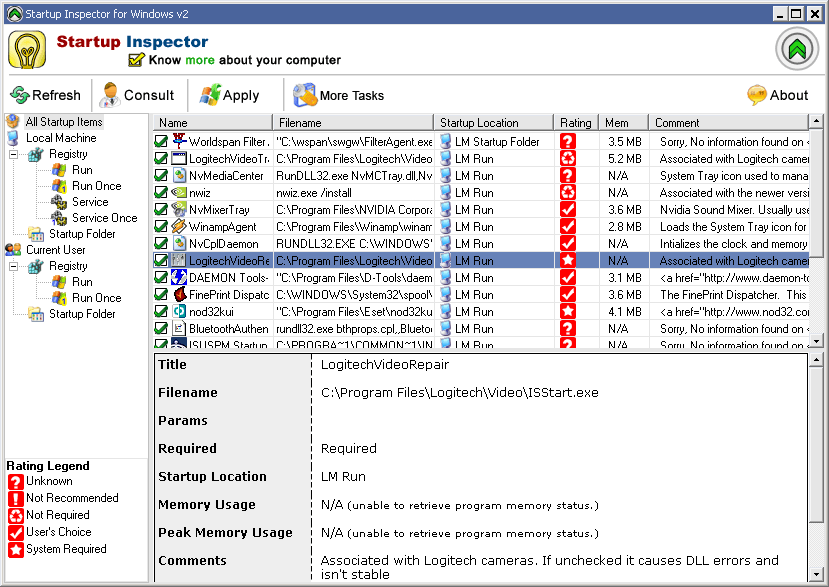
Startup Inspector window showing startup programs, ratings and a detail panel.
Program list and detail viewVersion 2.2
Knowledge Base6,359 entries
Startup MonitorChange alerts
The toolkit

Two small tools, one clear picture.

Startup Inspector shows you what is starting. Startup Monitor watches for changes after the fact. Both are small, free and made for Windows.

Startup Inspector lightbulb icon

Startup Inspector

Version 2.1 and 2.2 667 KB Freeware

A Windows platform software that helps novice and expert users manage Windows startup applications. It scans the Startup Folder and the Registry, then shows background information for each program.

  • Identifies programs that are needed by the system.
  • Helps remove harmful programs such as spyware, virus and diallers.
  • Helps remove unnecessary reminders and monitors to improve performance.

Explore Startup Inspector
Startup Monitor arrow icon

Startup Monitor

Version 1.0 beta 300 KB Freeware

A monitoring program that keeps a constant eye on startup application changes. Whenever a change is made, you are notified and given a choice to allow it or not.

  • Watches the startup entries on your system.
  • Asks before a new startup change is accepted.
  • Lets you restore the original state when you refuse a change.
Explore Startup Monitor
Knowledge Base

Look up a startup program before you decide.

The Startup Application Knowledge Base is the database behind Startup Inspector. It holds 6,359 program records, each with a rating and plain comments, so you can tell whether a program is necessary or suspicious.

Jump to a letter

Letters with no recorded entry show an honest empty state and a link to the search page.

How it helps

What Startup Inspector actually does.

No hidden extras. Four jobs, taken directly from the way the program works.

  1. Scan

    Reads the programs in the Windows Startup Folder and the Registry entries that launch at sign in.

  2. Explain

    Shows background information for each program from a database of more than 4,900 known programs.

  3. Clean

    Helps remove harmful programs such as spyware, virus and diallers, along with reminders and monitors you do not need.

  4. Monitor

    Startup Monitor watches for later changes and asks you to allow or reject them before they settle in.

Free to download

Free to download. Free to keep.

Startup Inspector for Windows is freeware. If the program helps you, you can support the project with a donation through PayPal from the download page.

Go to the download page
The site author standing in Zhouzhuang, China, in February 2004.
Behind the site

Built by one programmer, kept useful by its users.

The site is maintained by a London based software developer who works with Delphi and PHP and has experience with VB, HTML, JavaScript and C. The knowledge base grows through contributions from computer users who add the programs they know.

The photograph on this page was taken in Zhouzhuang, China, in February 2004, and is part of the original photo gallery on the About Me page.

Read about the author